
Press kit
Everything needed to write about Folio Refresh or list it: the press release, descriptions in four lengths, the key features, the facts, a one-page fact sheet, the app icon and screenshots. Every file has a permanent address, printed beside it to copy into a form. Or download everything as one zip. Questions, review copies and interviews: hello@caddora.ie.

Folio Refresh
Duplicate photos, found and cleared safely, on a Mac
Press release
Issued 28 October 2026. Republish it whole, quote it, or lift a sentence; no permission is needed. Link to it at https://caddora.ie/folio/press#release
FOR IMMEDIATE RELEASE
Folio Refresh: duplicate photos, found and cleared safely, on a Mac
Naas, Co. Kildare, Ireland, 28 October 2026
Folio Refresh finds photos saved more than once across your folders, Photos library, Lightroom Classic and Capture One catalogs. It suggests which copy to keep and says why, steers away from the frame where someone blinked, and moves nothing until you have looked and approved it.
Photos end up on a Mac more than once without anyone meaning it: imported twice, saved from a message, copied back from an old Mac, shot as a burst of twenty. Most duplicate finders only look in folders, and deleting files behind a photo catalog breaks it. Folio Refresh looks where photos actually live and cleans each place the way its own app expects. Duplicates in Photos go into a review album, Lightroom Classic duplicates are marked Rejected and Capture One duplicates are tagged Red, with the catalog backed up first.
It is a notarised direct download from caddora.ie/folio, and a Mac App Store edition, Folio Refresh: Photo Cleaner, is available.
Key features
- Finds identical, similar and burst photos
- Folders, Photos, Lightroom Classic and Capture One
- Suggests the copy to keep, and why
- Prefers the frame with eyes open
- On-device photo quality score
- Side-by-side compare with linked zoom
- Shrinks videos and photos instead of deleting
- Every clean-up can be undone
- Made for touch-screen Macs: every control works with a tap
- Free for your first 100 photos
- No account, no tracking, no subscription
Who it helps
Anyone whose photos are spread across folders, drives and the Photos library; photographers using Lightroom Classic or Capture One; families with bursts and near-identical shots; anyone short of space who does not want to lose a picture; and anyone afraid of deleting the wrong photo.
"I had twenty years of photos and videos spread across old Macs, external drives and my Photos library, and most of it was copies, bursts and near-identical shots. I built Folio Refresh to find the duplicates, point out the best frame, shrink the videos I'd never delete, and leave me with the pictures I actually treasure," said John Sheehy, developer of Folio Refresh and founder of Caddora.
What it will not do
It will not delete anything outright: folders use the Trash, Photos asks you first, and catalog markings can be undone. It will not upload your photos; the quality score and face checks run on your Mac. And it does not find duplicate videos, and says so rather than pretending to.
Privacy
No account, no tracking and no adverts. Photos are read on the Mac and never leave it.
Pricing and availability
Free to try: scan, review and clean your first 100 photos. Then $14.99 / €14.99 once, with no subscription. The Mac App Store edition (Folio Refresh: Photo Cleaner) is the same price. Requires macOS 15 Sequoia or later, Apple silicon and Intel. The current version is 1.1.1 (31 October 2026). Made in Ireland by Caddora.
About Caddora
Caddora is an independent Irish app developer based in Naas, Co. Kildare, and makes Folio Refresh, RefreshYourMac, RefreshMyPhone, SofiLingo, ChargingSpots, Cameleon and Caddora Golf.
Links
- Download, free to try with no sign-up: https://downloads.refreshyourmac.com/folioluma/FolioRefresh.dmg
- Mac App Store: https://apps.apple.com/app/folio-refresh-photo-cleaner/id6827234848
- The 30-second demo video: https://www.youtube.com/watch?v=L8jbv4FlCTg, or as a file: https://caddora.ie/folio/demo/folio-refresh-demo.mp4
- Press kit, with the icon, screenshots and a fact sheet: https://caddora.ie/folio/press
- All of it in one zip: https://caddora.ie/folio/press/folio-refresh-press-kit.zip
- Website: https://caddora.ie/folio, and how it compares: https://caddora.ie/folio/compare
Press contact
John Sheehy, Caddora
hello@caddora.ie
Press kit, screenshots and icon: https://caddora.ie/folio/press
Review licences: the release we email to journalists includes a free licence key. Download Folio Refresh, paste the key into Settings, and every feature is unlocked. Not on our list? Ask at hello@caddora.ie.
###
Descriptions
Tagline 52 characters
Duplicate photos, found and cleared safely, on a Mac
Short 141 characters
Folio Refresh finds duplicate, similar and burst photos in your folders, Photos library and catalogs, and moves nothing until you approve it.
Description 280 characters
Folio Refresh finds photos saved more than once across your folders, Photos library, Lightroom Classic and Capture One catalogs. It suggests which copy to keep and says why, steers away from the frame where someone blinked, and moves nothing until you have looked and approved it.
Longer 181 words
Folio Refresh is a duplicate photo cleaner for the Mac. It finds identical copies, even renamed ones; the same photo resized, cropped, rotated or lightly edited; and bursts taken seconds apart. It looks where photos actually live: folders and external drives, the Apple Photos library, and Lightroom Classic and Capture One catalogs, cleaning each the way that app expects. Duplicates in Photos go into a review album, Lightroom duplicates are marked Rejected and Capture One duplicates tagged Red, with the catalog backed up first. Every group suggests the photo to keep and says why: eyes open, a clearly better quality score from Apple's on-device model, the most pixels, the copy you edited. It can also shrink big videos and photos instead of deleting them, and it is made for touch-screen Macs: every control works with a tap. Nothing moves until you approve it, every group keeps a copy, and any clean-up can be undone. Your photos never leave your Mac. Scan, review and clean your first 100 photos free, then $14.99 once. No account, no subscription. Made in Ireland by Caddora.
Key features
- Finds every kind of duplicate. Identical copies whatever they are called, the same photo resized, re-saved, cropped or lightly edited, and bursts taken seconds apart. JPEG, PNG, HEIC, TIFF and camera RAW.
- Works where your photos live. Folders and drives, the Apple Photos library, and Lightroom Classic and Capture One catalogs, each cleaned the way that app expects.
- Suggests the copy to keep, and says why. Eyes open first, then a clearly better quality score from Apple's on-device model, then the most pixels and the original. Reorder the rules or lock any photo.
- Shrinks instead of deleting. Compress videos to HEVC, JPEG and TIFF photos to HEIC, and Live Photos to their still picture, with the space saved shown first.
- Made for touch-screen Macs. Every control works with a tap, the text is large enough to read, and an ⓘ opens what other apps hide in a hover tooltip.
- Safe by design, and private. Nothing moves until you approve it, every group keeps a copy, and any clean-up can be undone. Photos are read on your Mac and never uploaded. No account, no tracking.
Facts
- Name
- Folio Refresh (Mac App Store name: Folio Refresh: Photo Cleaner)
- Developer
- Caddora, Ireland
- Website
- https://caddora.ie/folio
- Category
- Photography / Utilities / Duplicate photo finder
- Platform
- macOS 15 Sequoia or later, Apple silicon and Intel, touch-screen Macs included
- Latest version
- 1.1.1 (31 October 2026). 1.1 made it ready for touch-screen Macs
- Price
- Free to try: scan, review and clean your first 100 photos. Then $14.99 once (€14.99 in the euro App Store). No subscription.
- Distribution
- Direct download, signed and notarised by Apple, and on the Mac App Store as Folio Refresh: Photo Cleaner.
- Languages
- English
- Contact
- hello@caddora.ie
Links
- Website
- https://caddora.ie/folio
- Download
- https://downloads.refreshyourmac.com/folioluma/FolioRefresh.dmg
- Buy (download edition)
- https://caddora.ie/buy/folio/press
- Mac App Store
- https://apps.apple.com/app/folio-refresh-photo-cleaner/id6827234848
- How it compares
- https://caddora.ie/folio/compare
- Privacy policy
- https://caddora.ie/folio/privacy
- Support
- https://caddora.ie/folio/support
- Press kit
- https://caddora.ie/folio/press
Fact sheet, release and share card
- Fact sheet
- One A4 page: what it is, what it finds, where it looks, price and availability.
https://caddora.ie/folio/press/folio-refresh-fact-sheet.pdf - Press release, plain text
- The release below, ready to paste into an email.
https://caddora.ie/folio/press/folio-refresh-press-release.txt - Share card, 1200 × 630
- The image Folio Refresh's pages show when a link is shared.
https://caddora.ie/folio/press/share-card.jpg
App icon
PNG with a transparent background, as macOS draws it.

32 × 32
https://caddora.ie/folio/press/icon-32.png
256 × 256
https://caddora.ie/folio/press/icon-256.png
512 × 512
https://caddora.ie/folio/press/icon-512.png
1024 × 1024
https://caddora.ie/folio/press/icon-1024.pngMaster. Downscale from this rather than re-exporting.
Screenshots
The real app, on a demo folder of free-to-use photos from Pexels. Retina size, PNG, each under 1 MB, with a link to the full-quality capture.
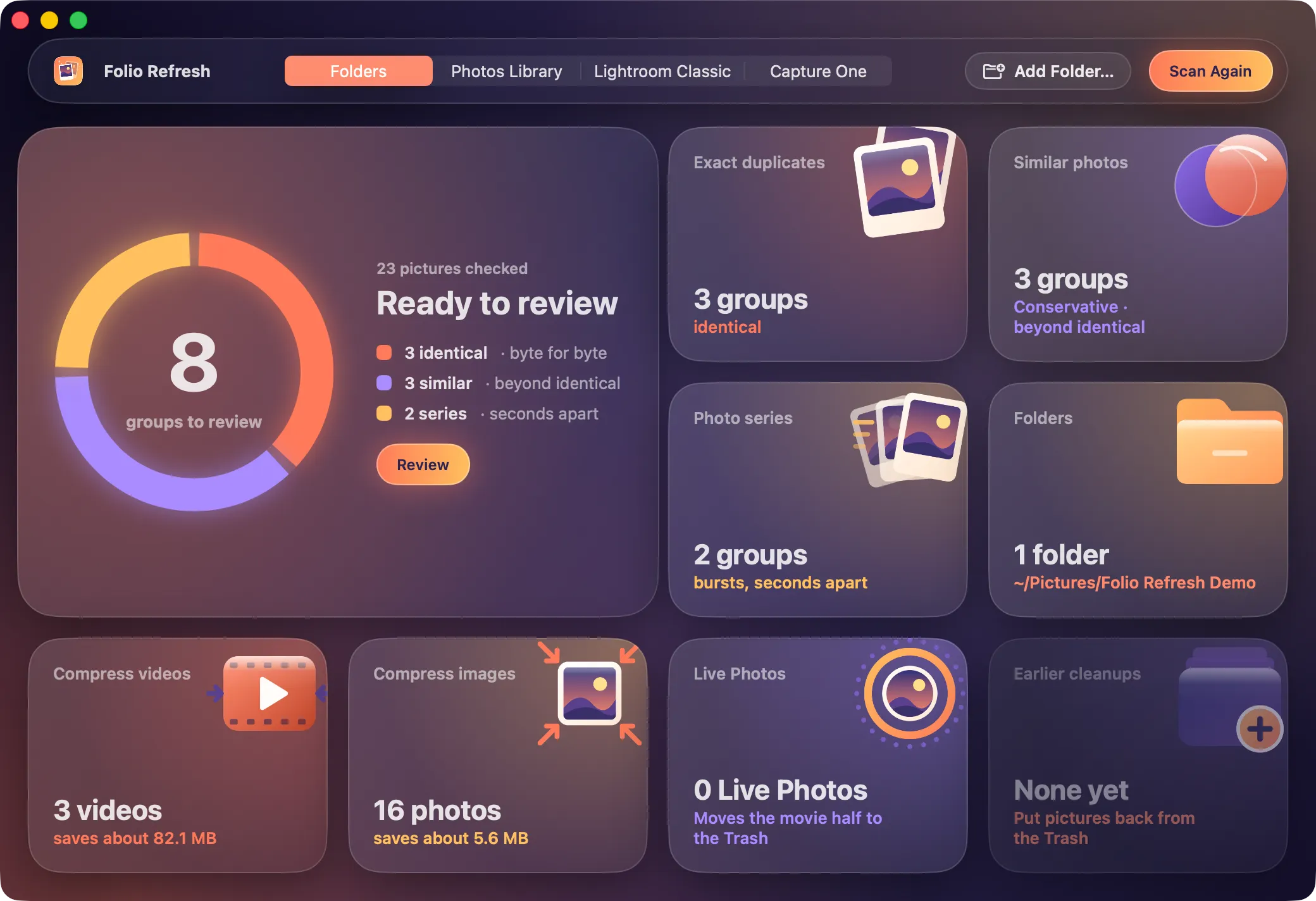
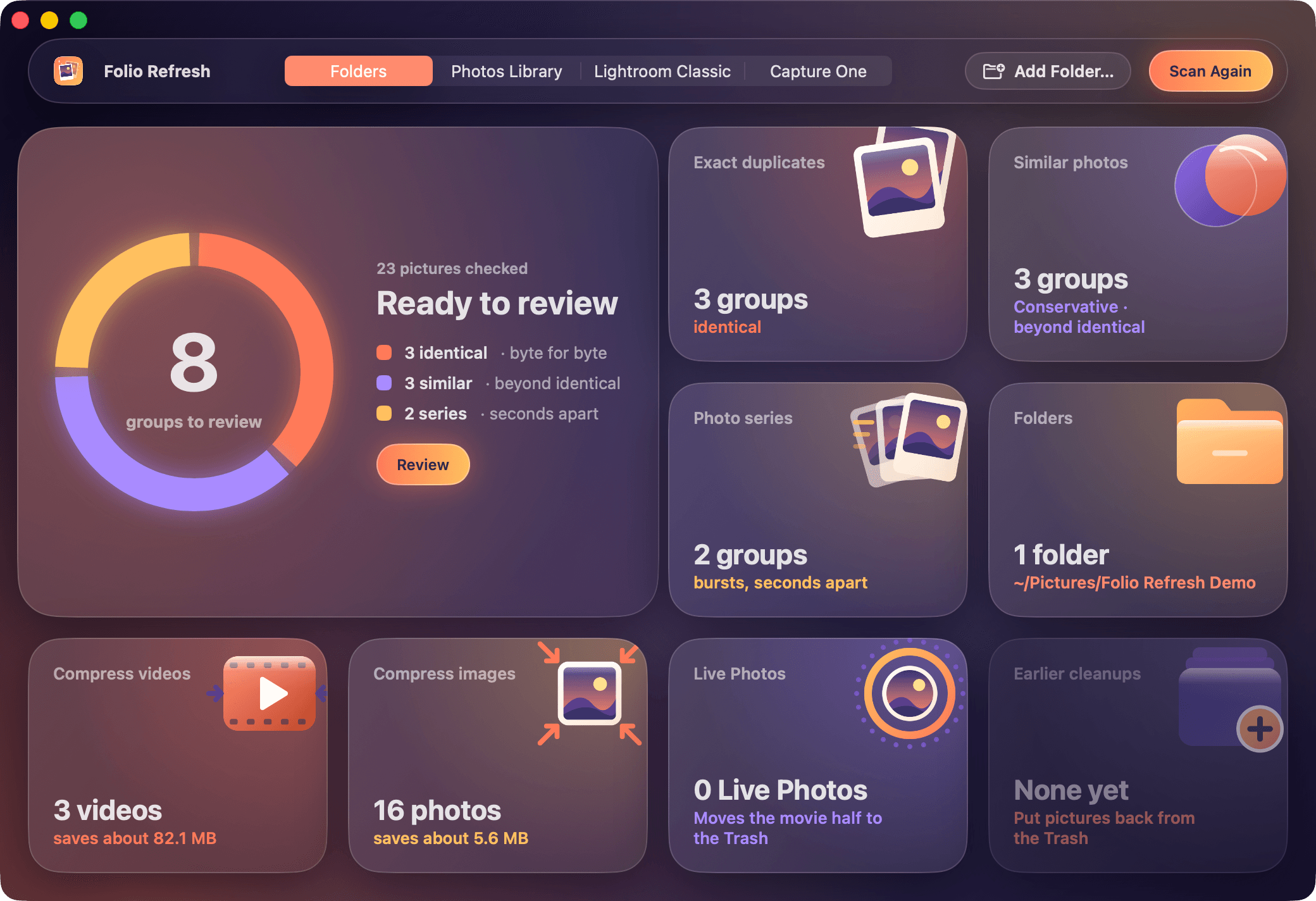
The main window 2080 × 1424
https://caddora.ie/folio/press/screenshot-window.pngThe one to use where a form asks for a single screenshot.
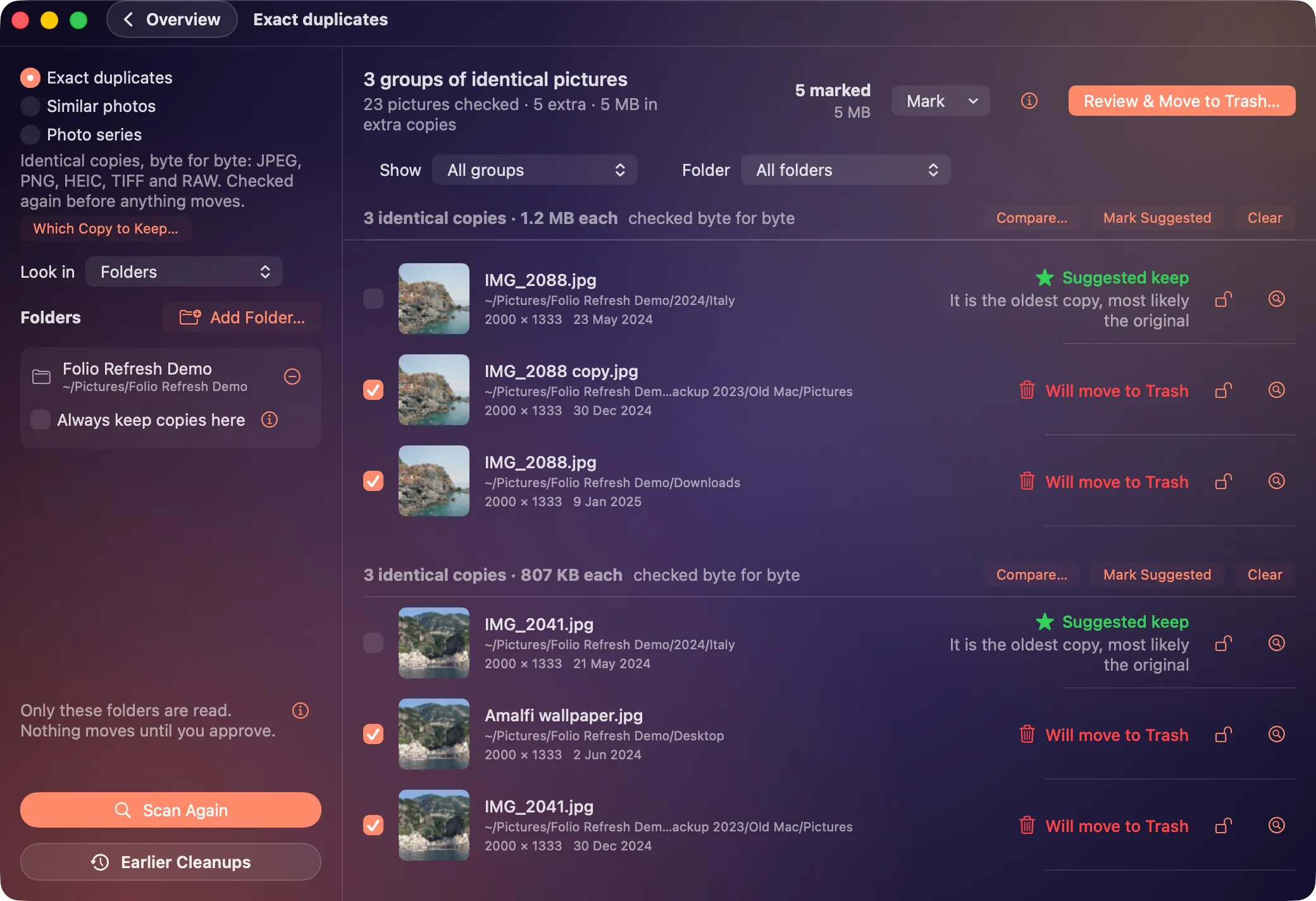
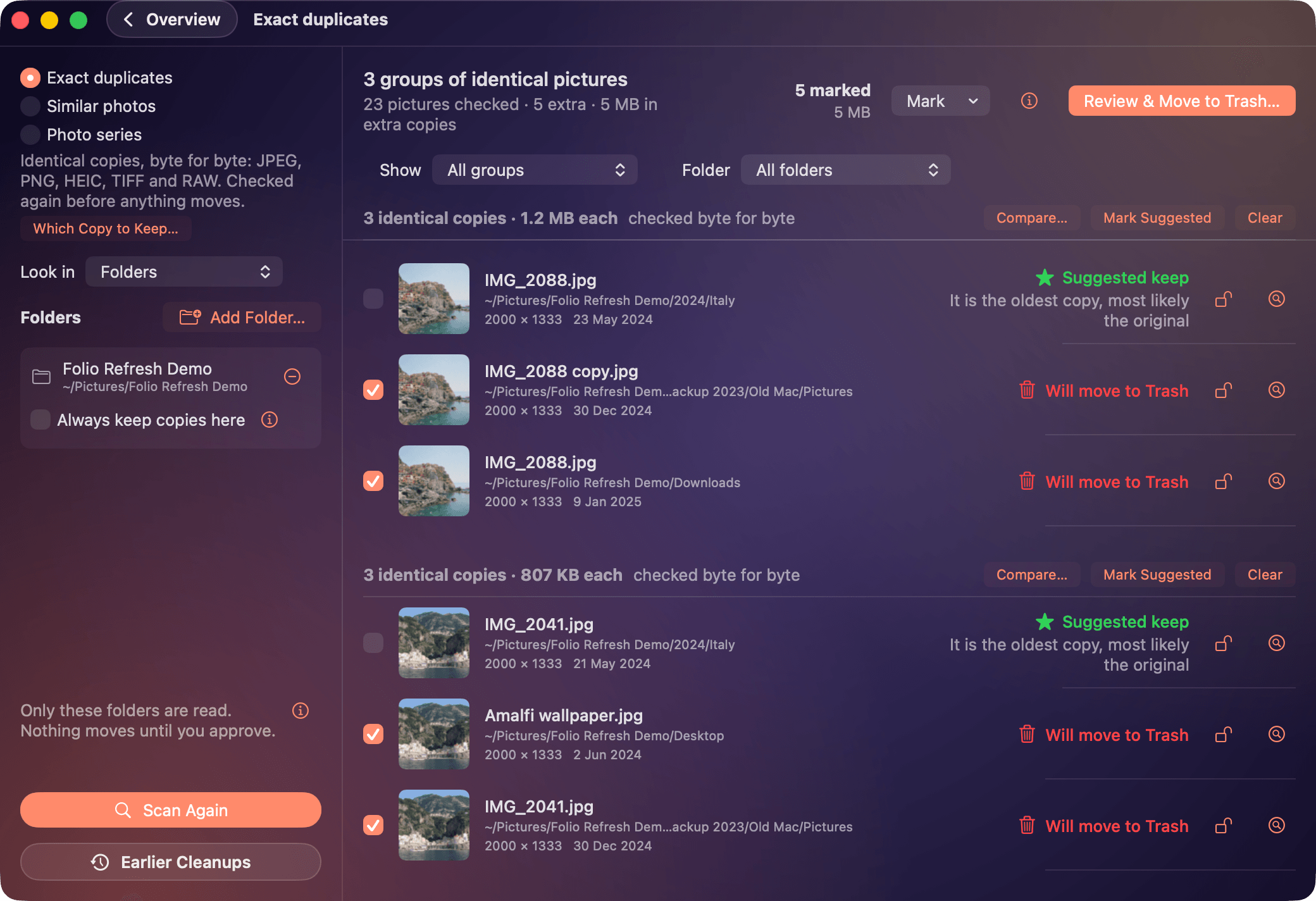
Identical copies 2080 × 1424
https://caddora.ie/folio/press/screenshot-identical.png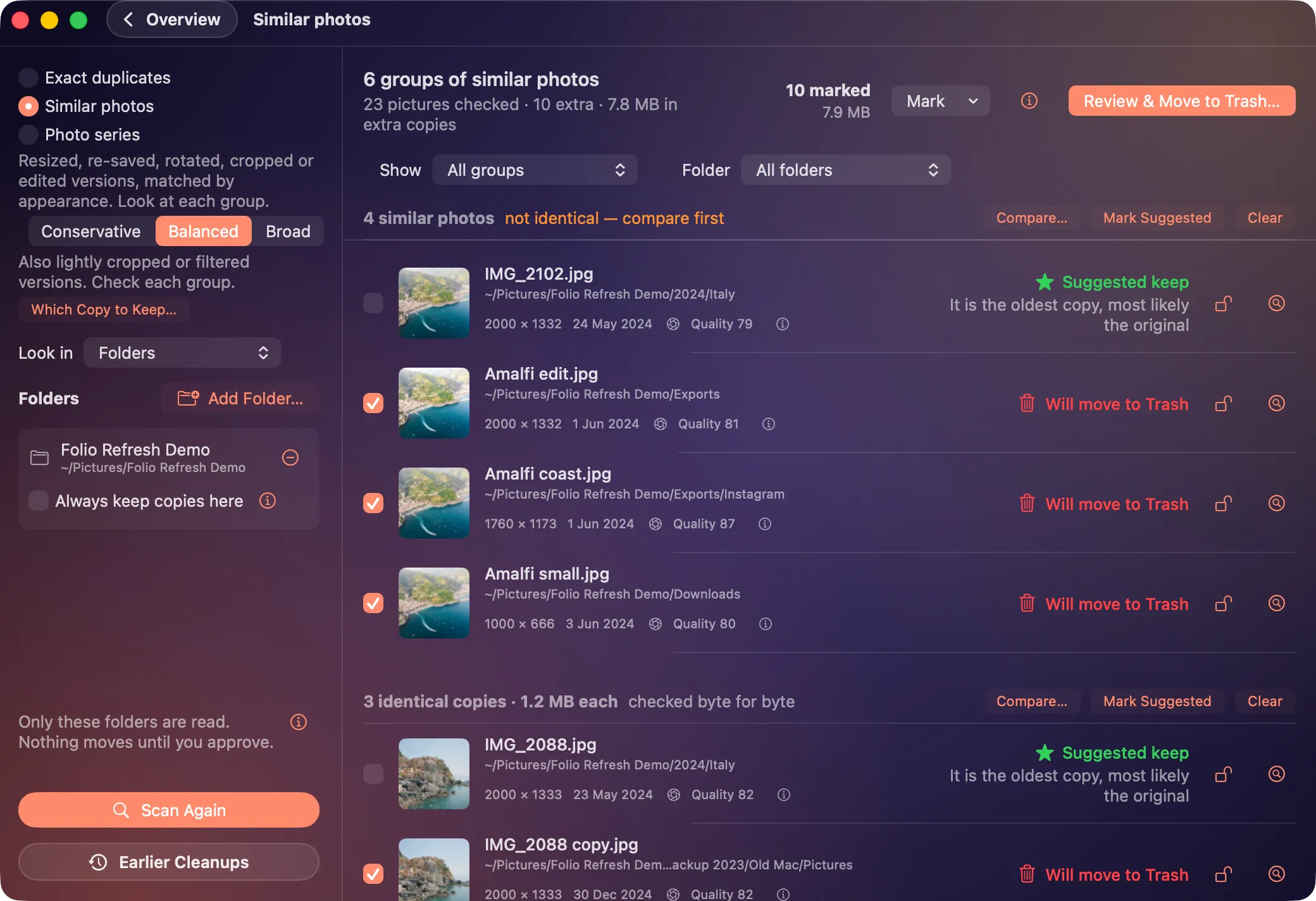
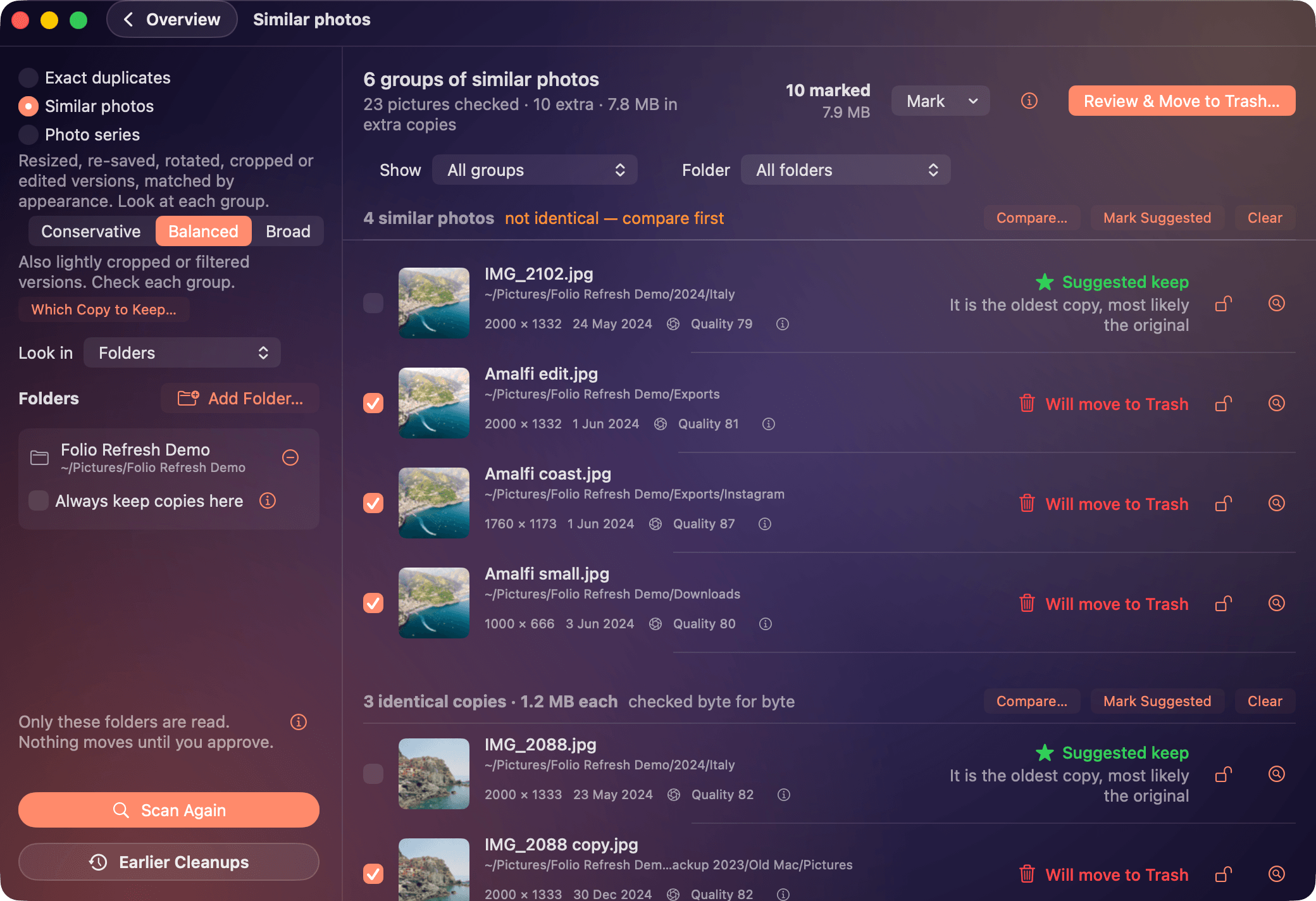
Similar photos 2080 × 1424
https://caddora.ie/folio/press/screenshot-similar.png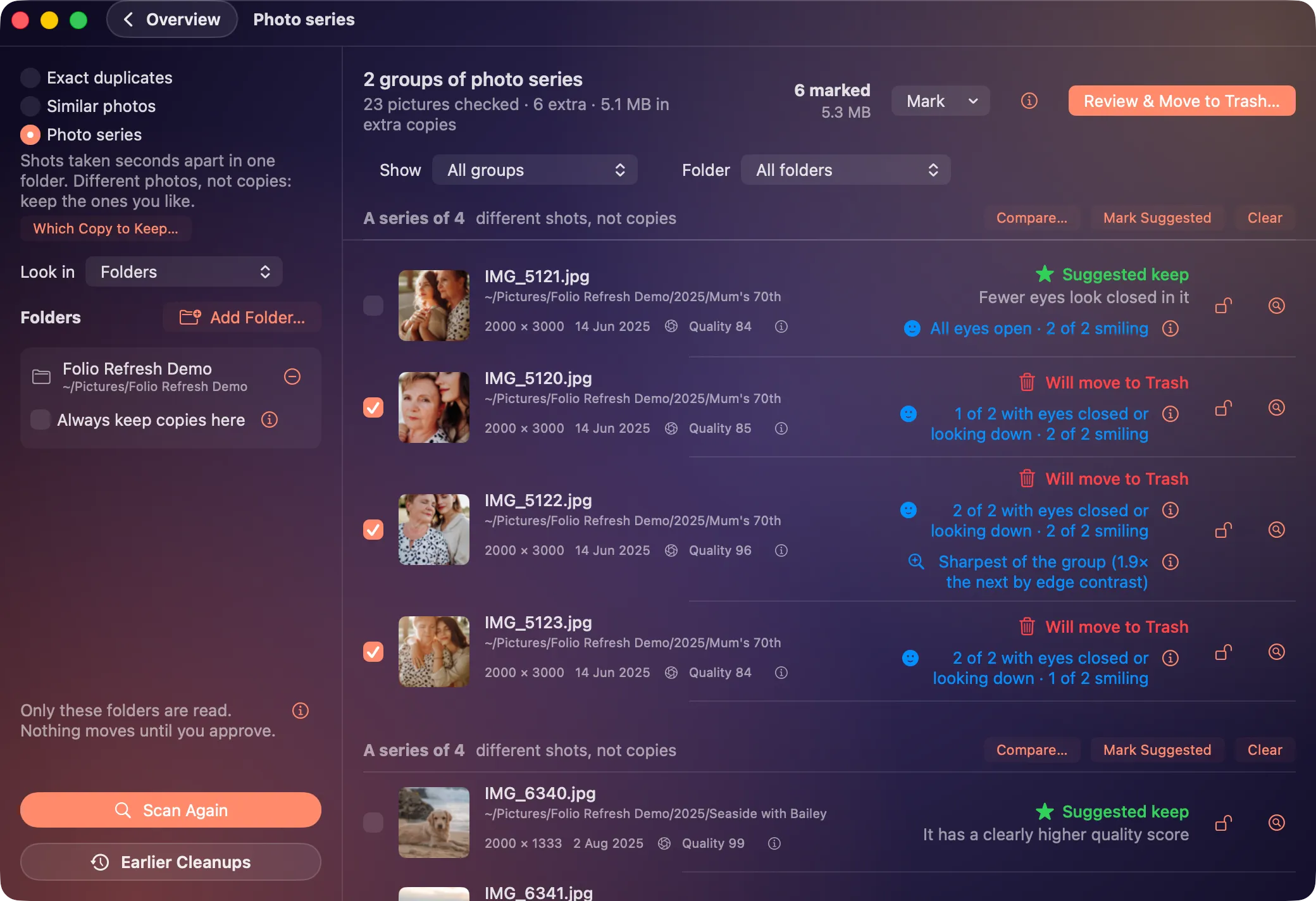
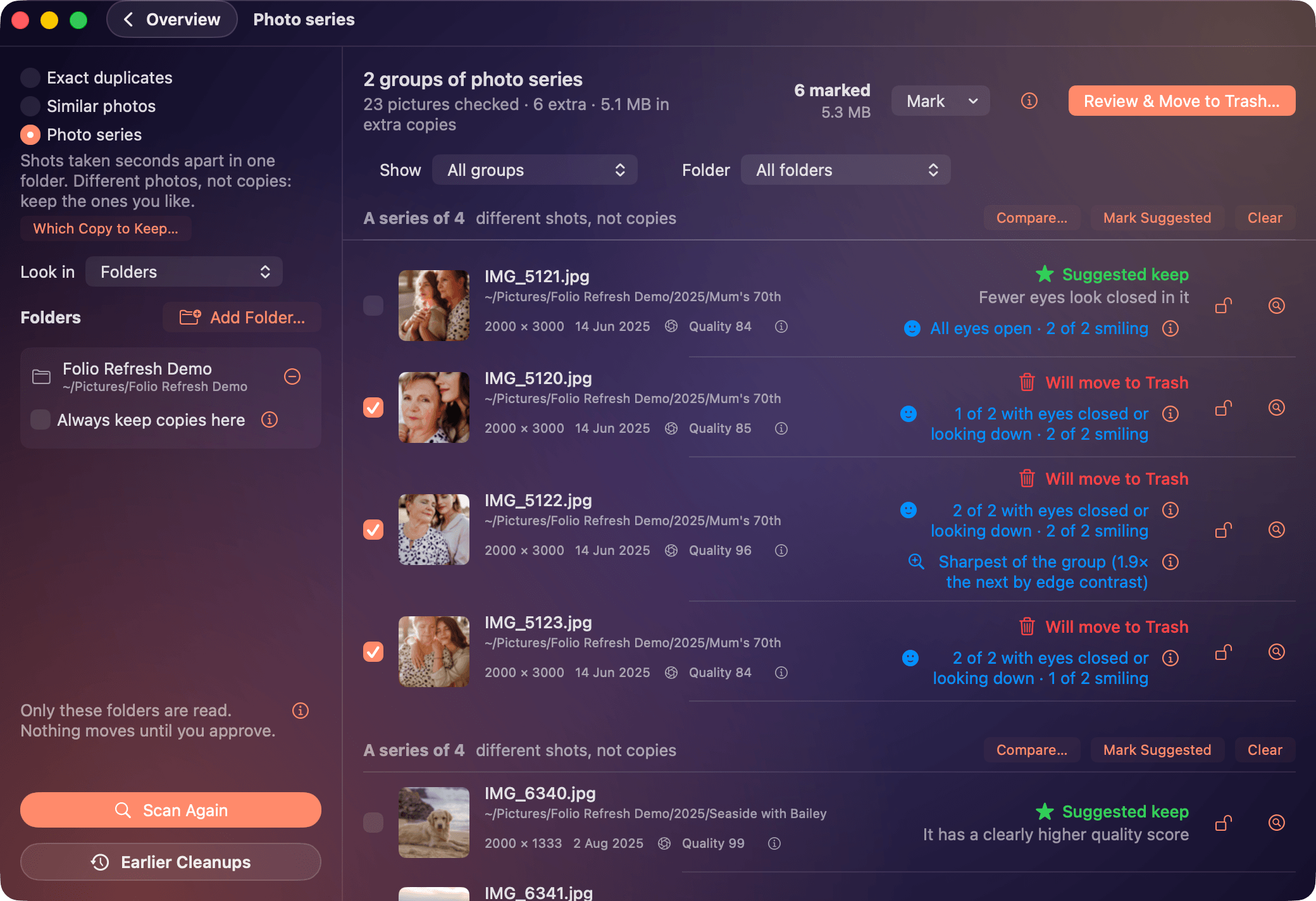
Bursts and series 2080 × 1424
https://caddora.ie/folio/press/screenshot-bursts.png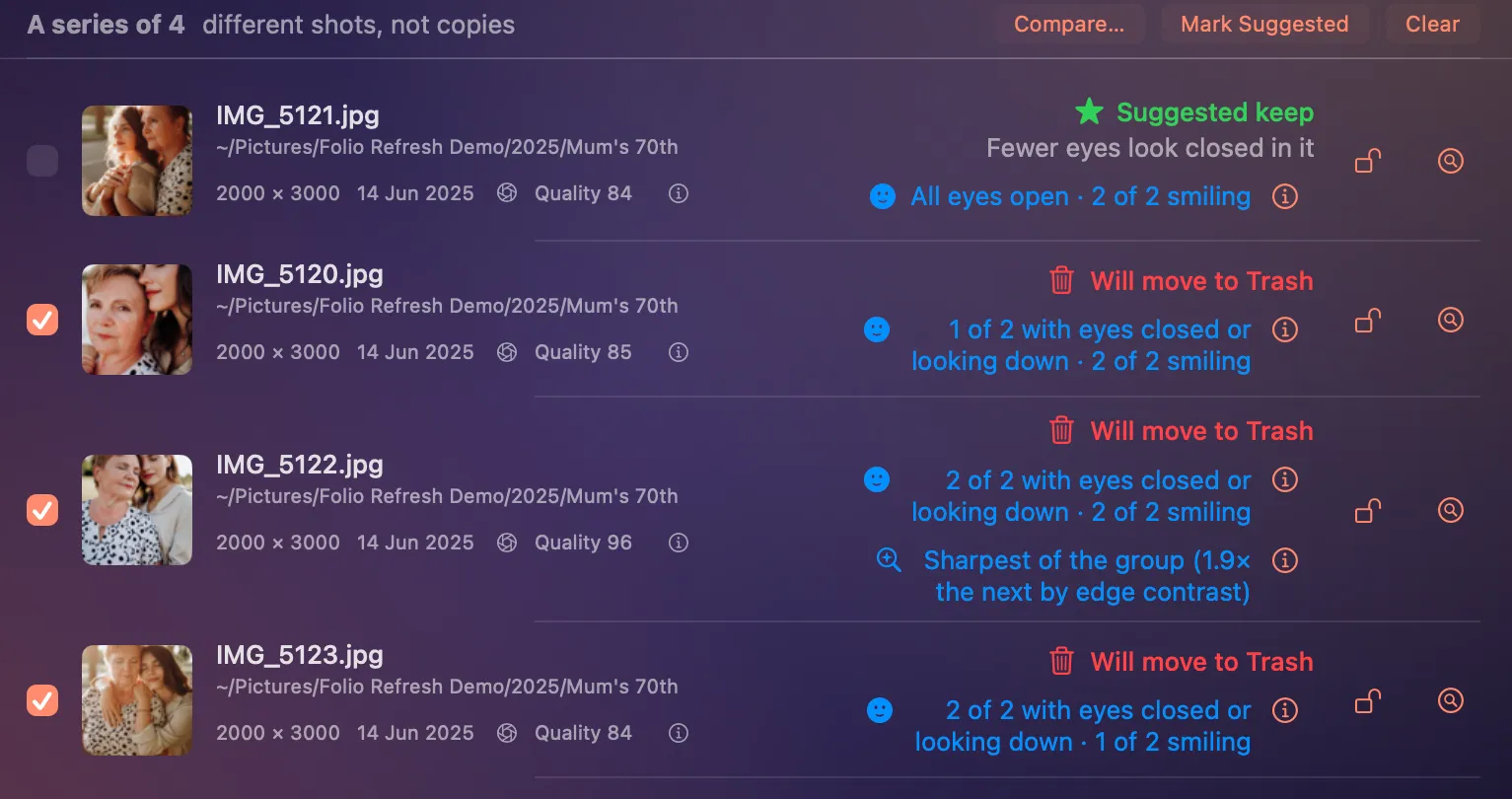
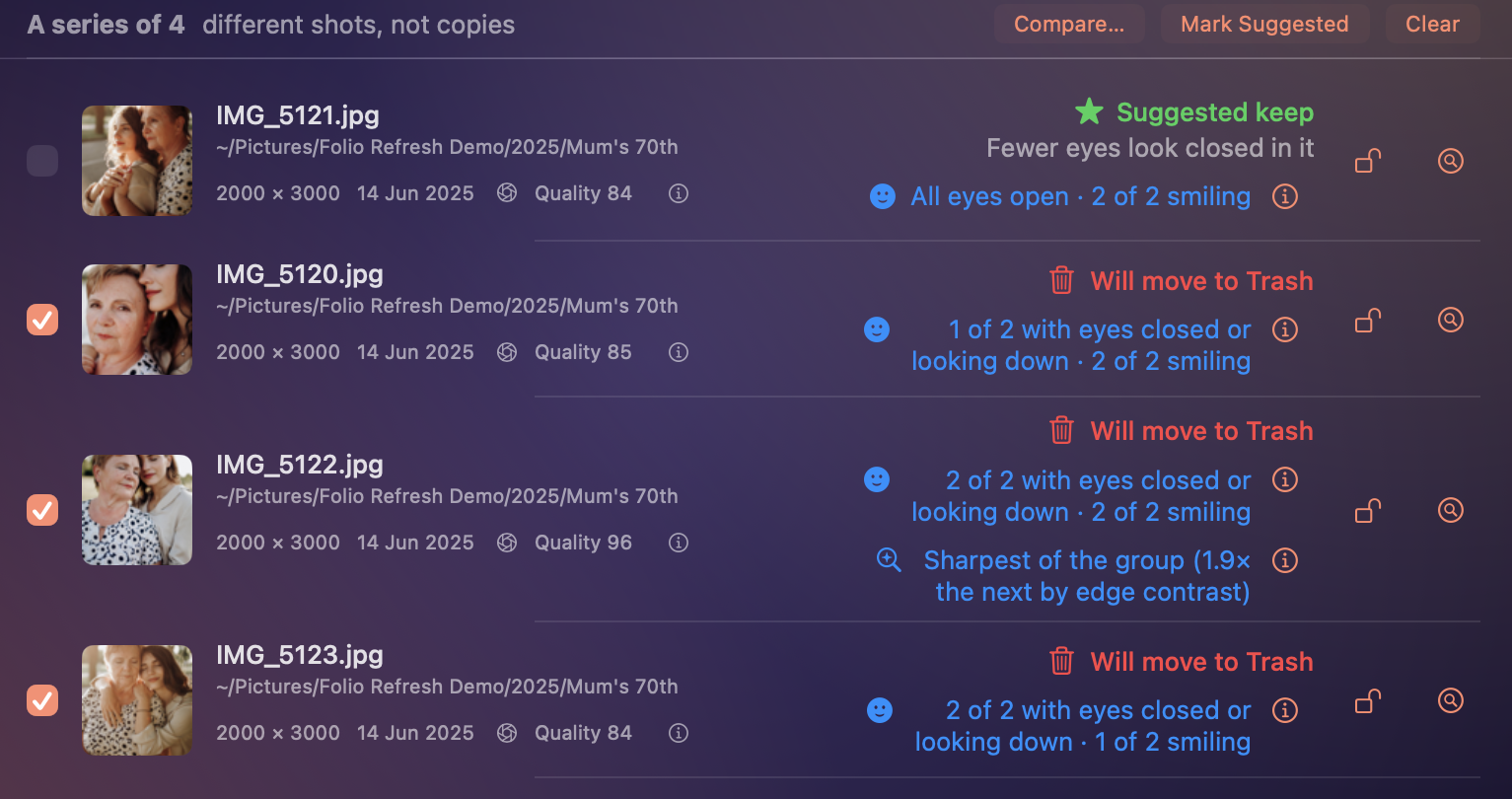
The suggested frame, and why 1533 × 694
https://caddora.ie/folio/press/screenshot-best-shot.png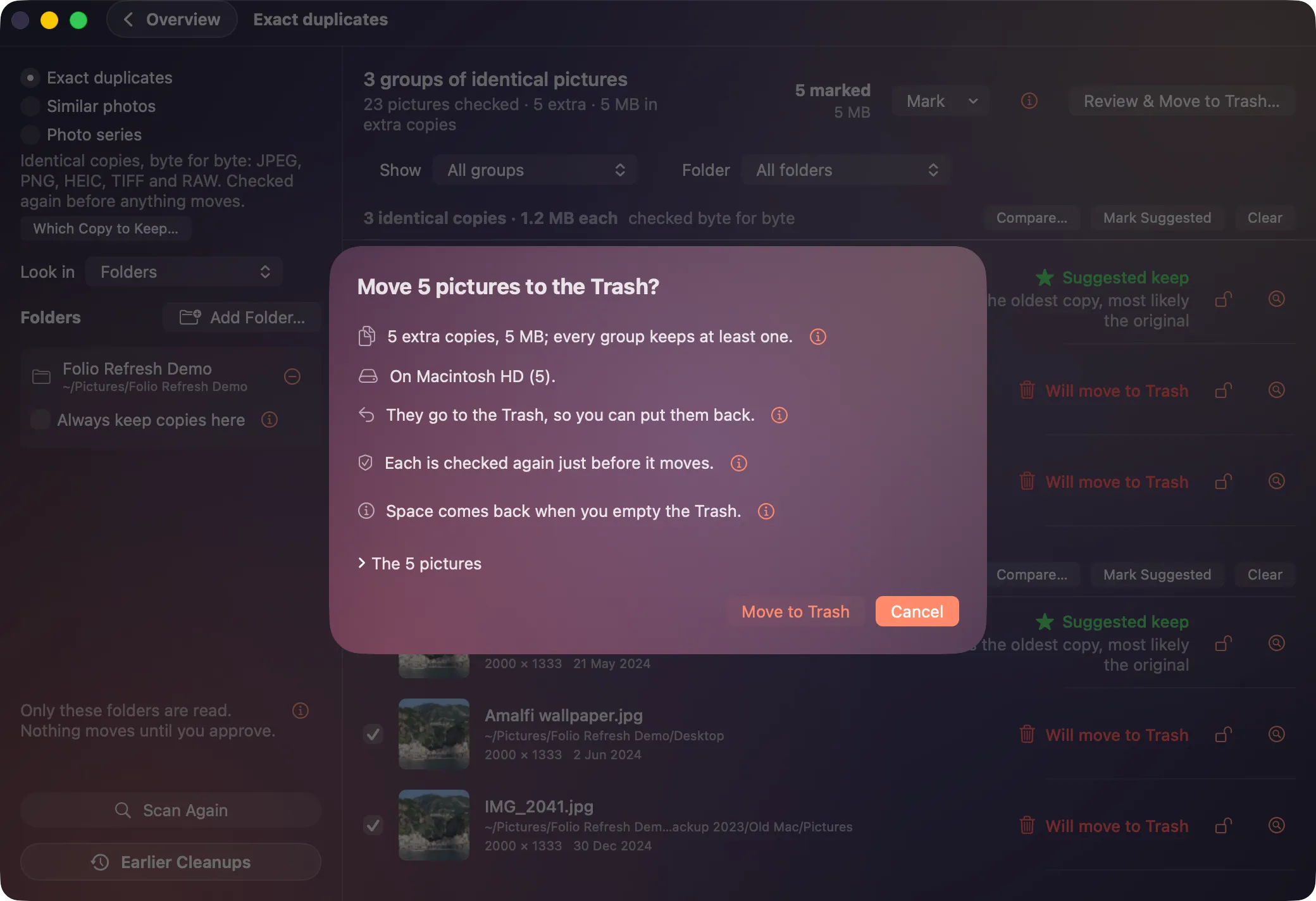
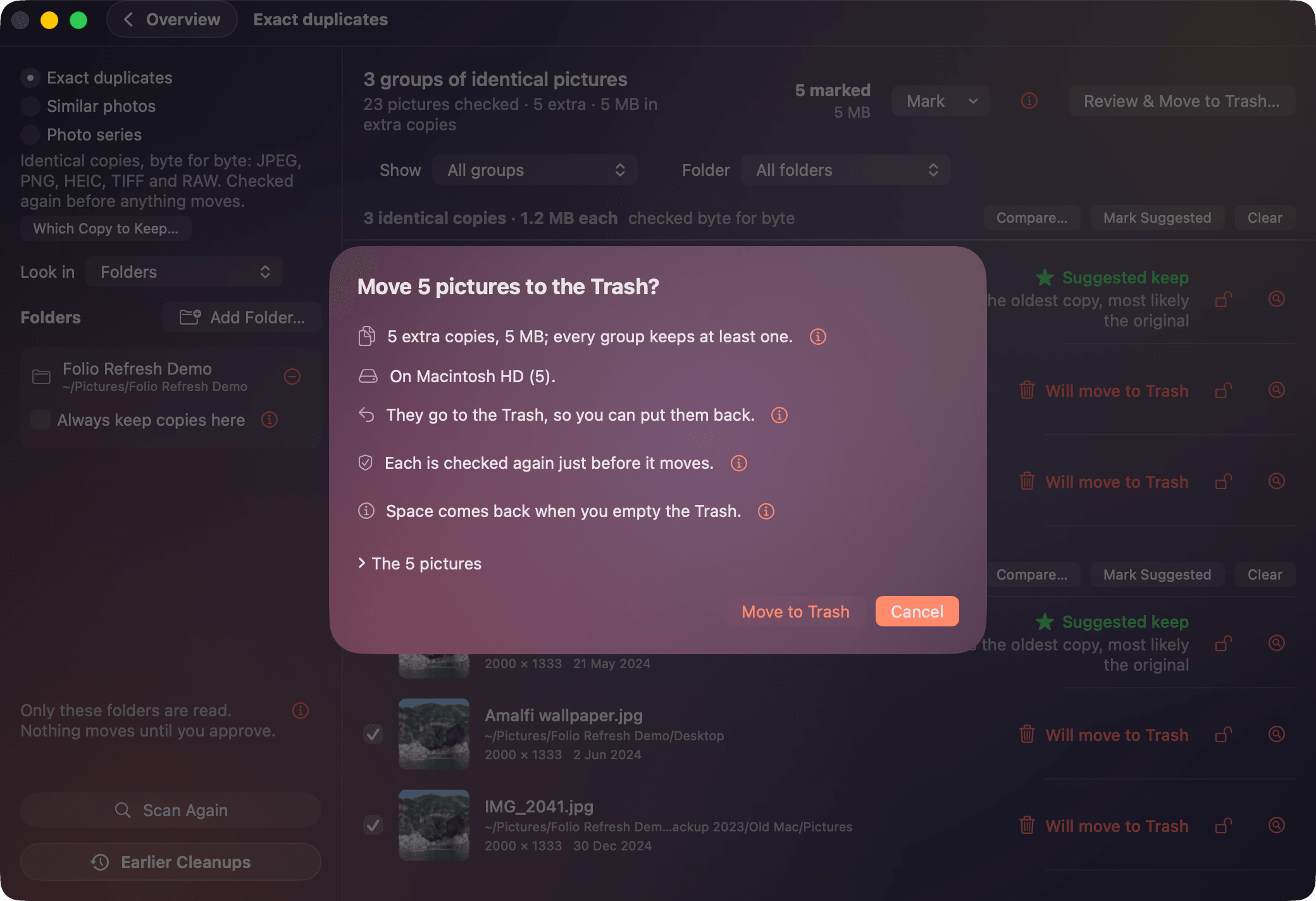
The review before anything moves 2080 × 1424
https://caddora.ie/folio/press/screenshot-review.png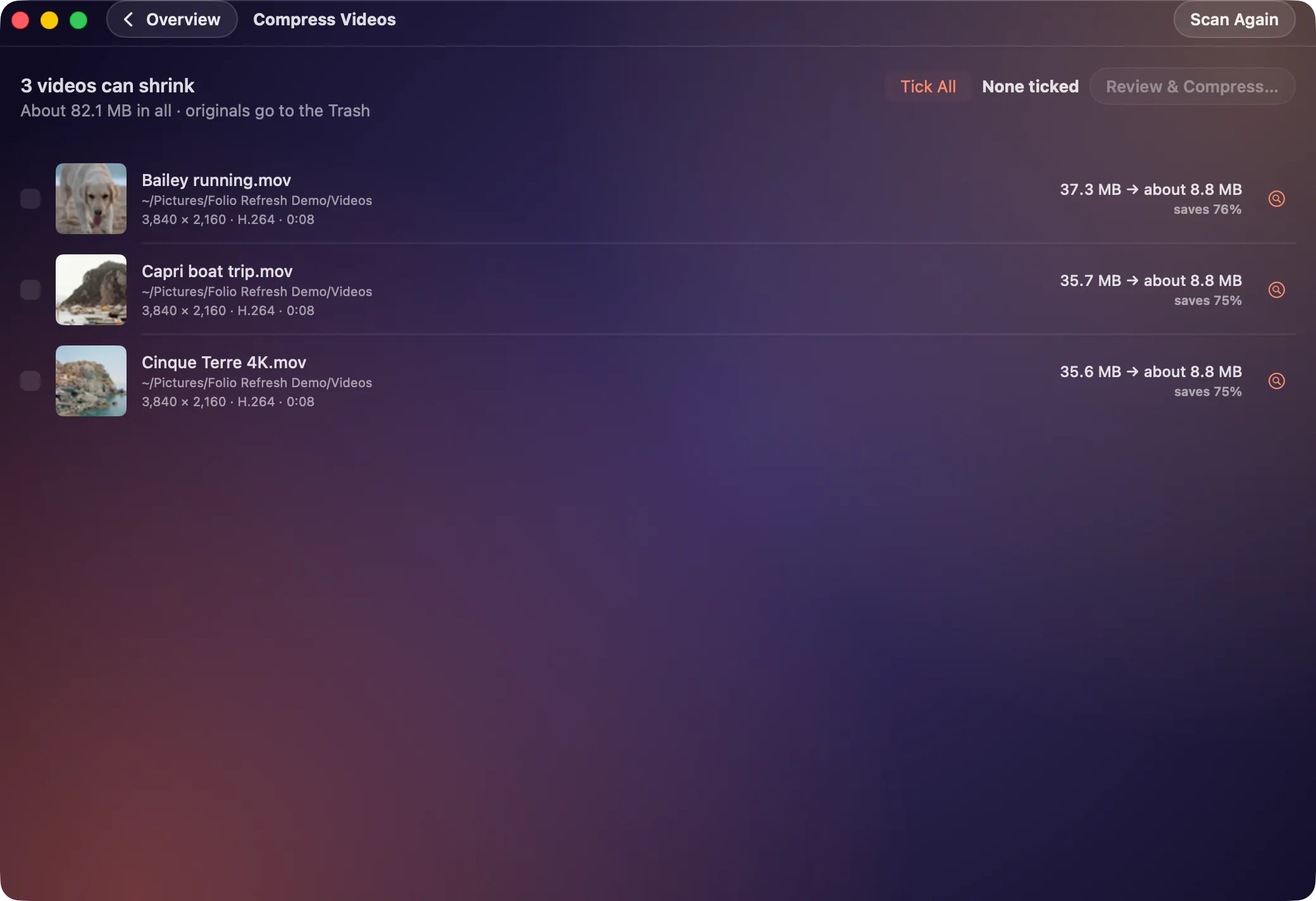
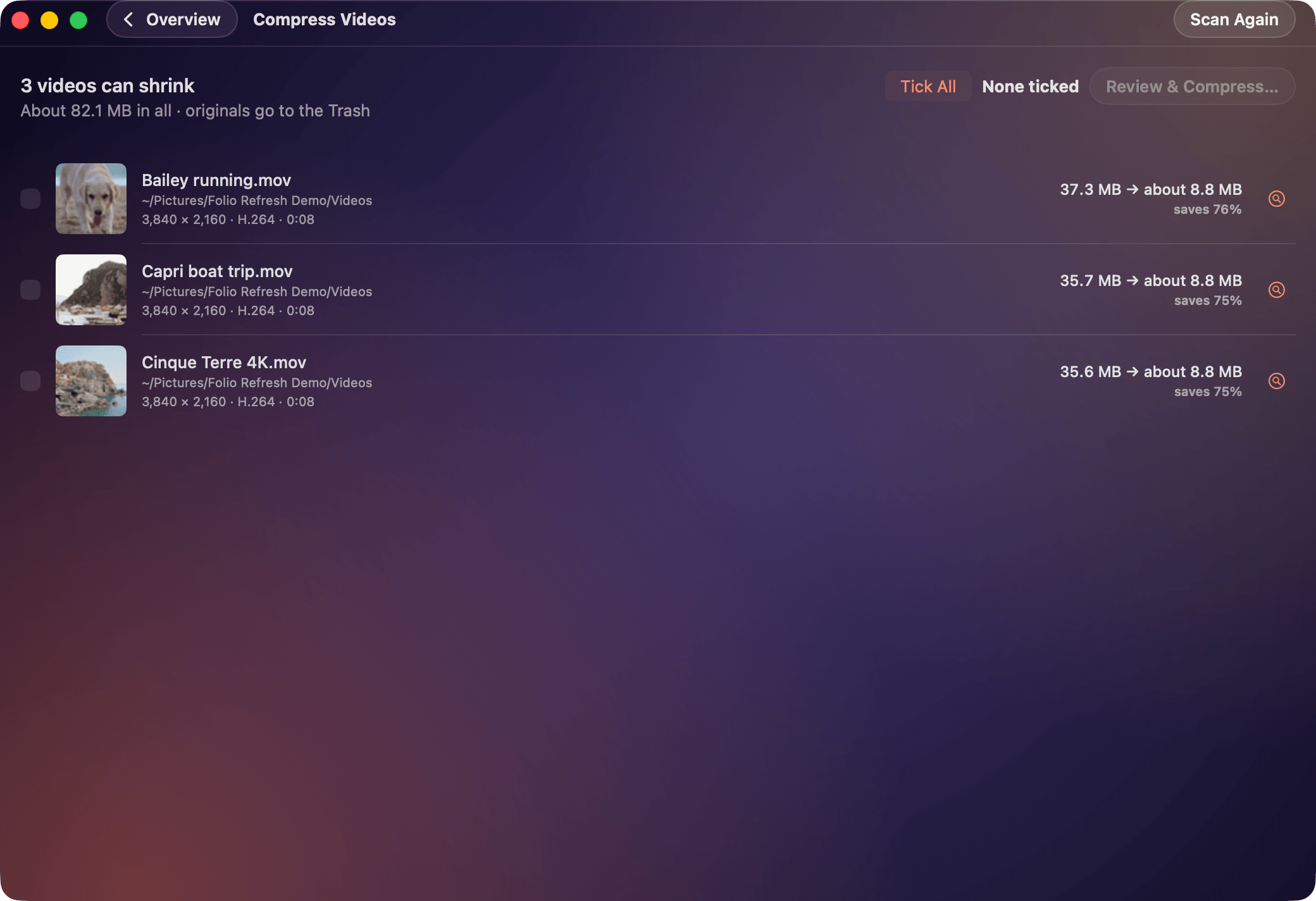
Shrinking videos 2080 × 1424
https://caddora.ie/folio/press/screenshot-shrink.png


Using these
Use the icon, screenshots and text freely to write about or list Folio Refresh. Please do not change the icon's colours or shape. The people in the screenshots are Pexels photographers' subjects, not customers.