
Folio Refresh · Best-shot suggestions
Know which photo to keep, and why
Free to try: scan, review and clean your first 100 photos. Then $14.99 once, no subscription. For macOS 15 or later, Apple silicon and Intel.
 Or get it from the Mac App Store: the same free 100 photos, the same price.
The problem
The hard part of clearing duplicates is not finding them, it is choosing. Keep the wrong one and you are left with the blurred frame, the one where someone blinked, or the small copy you emailed.
How Folio Refresh solves it
- A suggestion and a reason. Each group suggests the photo to keep and says why, in plain words.
- Rules you can reorder. Fewer closed eyes, a clearly higher quality score, more smiles, the most pixels, filed rather than left in Downloads, the oldest. Drag them into your own order or turn any off.
- Locks and keep-here folders. Lock any photo so it is always kept, or mark a folder so copies in it are never moved.
- In catalogs, your work counts. In Lightroom Classic and Capture One, the copy you edited, rated, tagged or put in an album is preferred.
Eyes and smiles
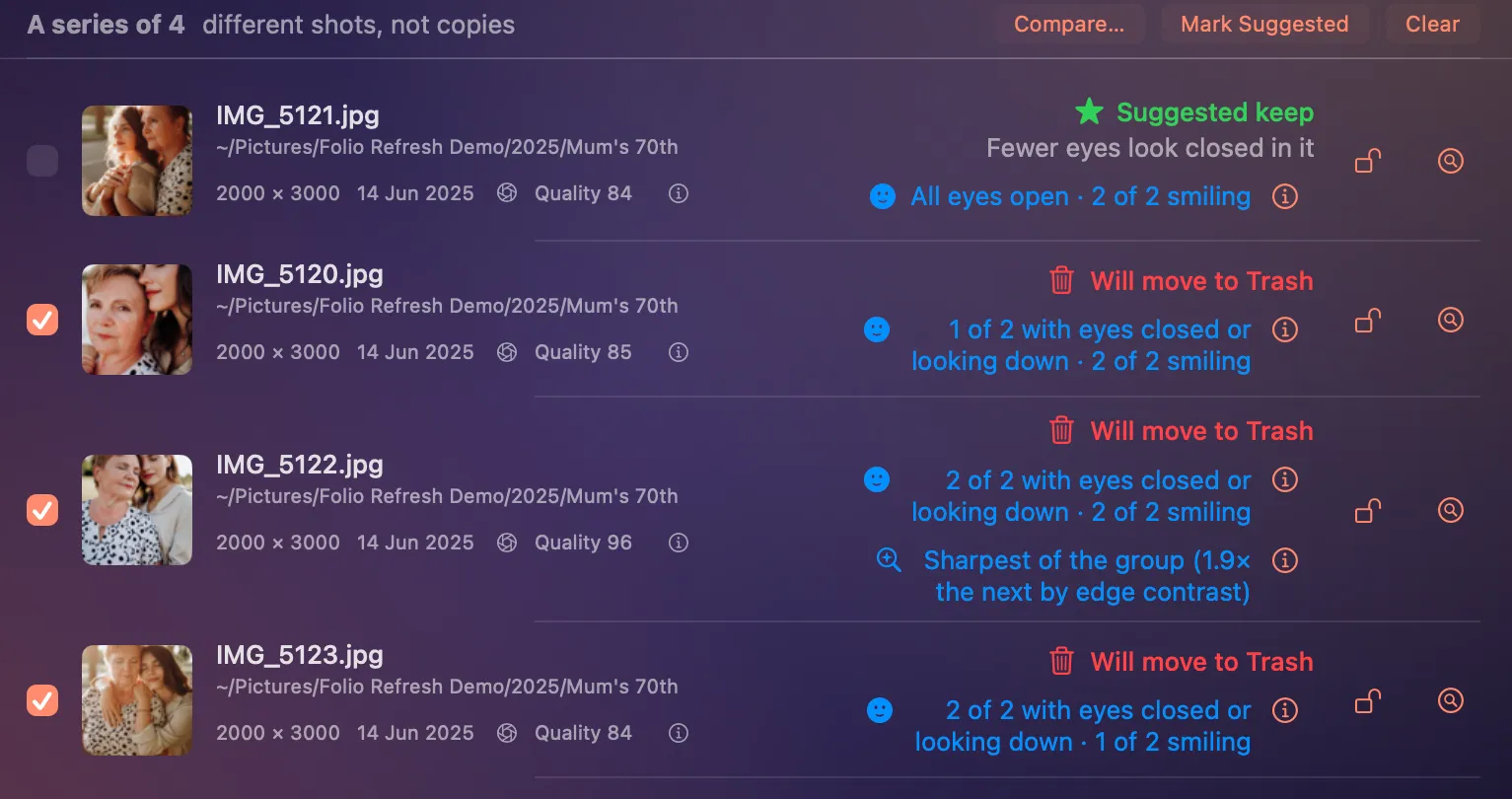
- In similar photos and series, Folio Refresh looks at the faces with the face detector built into macOS, on your Mac. It counts faces, closed eyes and smiles, and keeps nothing about who anyone is.
- It only compares photos that show the same number of faces. If it cannot see everyone in both, it says nothing.
- Fewer closed eyes comes before the quality score; a smile only decides when nothing more important does.
- Each photo gets a short note, such as “Eyes open” or “1 of 3 with eyes closed or looking down”. Someone looking down can read as eyes closed: the detector sees the eyelid, not the reason. Faces too small to judge are left out.
The quality score
- Similar photos and series show a score from 0 to 100. It is Apple's photo-quality model, built into macOS 15 and later, run on your Mac. No photo is uploaded to work it out.
- Apple describes it as weighing how sharp and well exposed a photo is, how it is framed, and whether it looks like a record, such as a screenshot or a receipt, rather than a picture.
- It only compares photos within one group. It is not a grade for a photo on its own, and scores from different scenes mean nothing side by side.
- It decides only when one photo scores at least 10 points higher; when they are close, the other rules decide. It is a model's opinion and can prefer the wrong frame, which is why you look at every group yourself.
Try it on your own photos.
Free to try: scan, review and clean your first 100 photos. Then $14.99 once, no subscription. For macOS 15 or later, Apple silicon and Intel.
Or get it from the Mac App Store: the same free 100 photos, the same price.